CVE-2025-7340 vulnerability and BitFire protection

How BitFire Stops CVE-2025-7340: Three Layers Against Unauthenticated File Uploads

WordPress vulnerability research

BitFire blocks CVE-2025-7340 with bot protection, WAF upload controls, and operating-system-level RASP protection against unauthorized PHP file changes.

Unauthenticated Critical Severity Remote Code Execution Risk Arbitrary File Upload
BitFire · Vulnerability advisoryResearch published
AdvisoryCVE-2025-7340
ComponentHT Contact Form Widget For Elementor Page Builder & Gutenberg Blocks & Form Builder
Relevant sourceadmin/Includes/Services/FileManager.php
Executive summary

What WordPress administrators need to know

CVE-2025-7340 is a critical arbitrary file upload vulnerability in HT Contact Form Widget for WordPress. In every version through 2.2.1, the unauthenticated temporary upload path accepts files without validating their type. An attacker can therefore attempt to place a PHP file on the server and, where the hosting configuration permits execution, turn the upload into remote code execution. BitFire interrupts this attack at three independent points: bot blocking stops automated exploit traffic, the WAF prevents unauthenticated clients from attaching PHP files to requests, and BitFire PRO RASP enforces operating-system-level controls that prevent non-administrators from modifying PHP files.

At a glance

Key facts

  • All plugin versions up to and including 2.2.1 are vulnerable
  • No WordPress account is required to reach the upload handler
  • Missing file type validation allows arbitrary files, including PHP, to be submitted
  • Successful PHP execution could give an attacker remote control of the site
  • BitFire provides independent bot, WAF, and operating-system-level RASP protections
01
Vulnerability overview

Understand the exposure

The affected component, attack path, and practical risk for WordPress websites.

Affected componentHT Contact Form Widget For Elementor Page Builder & Gutenberg Blocks & Form Builder
Potential reach10,000+ installations
Attack techniquearbitrary file upload
Published2025-07-15
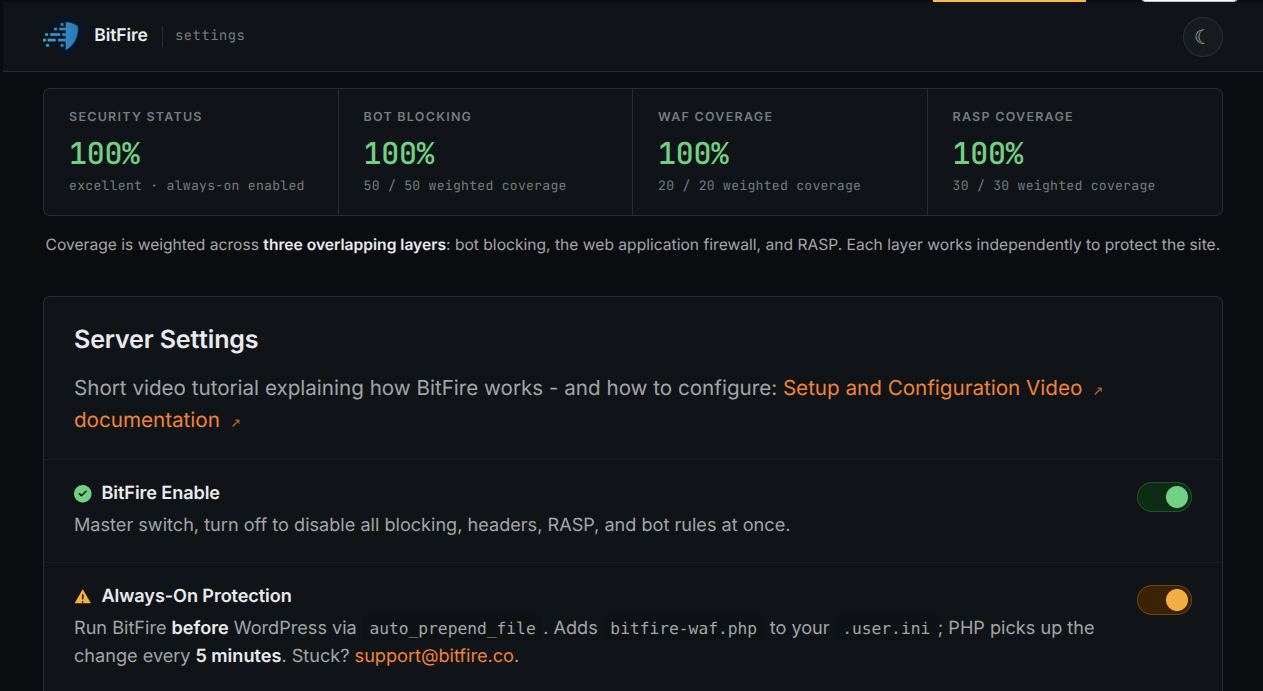
BitFire stops the attack three times: block the exploit bot, reject the PHP upload, and deny unauthorized PHP file changes at the operating-system level.
02
Technical analysis

How the vulnerability works

Research details, affected versions, exploitation behavior, and remediation guidance.

CVE-2025-7340 Turns a Public Upload Into a Critical Risk

HT Contact Form Widget registers its temporary upload action for visitors who are not logged in. In versions through 2.2.1, `temp_file_upload()` verifies only whether PHP reported an upload error. It sanitizes the supplied filename and moves the file into the plugin's temporary directory, but it does not reject executable file types. An unauthenticated attacker can therefore submit a PHP payload. If that uploaded file is reachable and executable under the server's configuration, the attacker may run code remotely, access WordPress data, install persistence, or use the site to attack other systems. That pre-authentication path and potential impact account for the critical 9.8 CVSS score.

Update HT Contact Form Widget to Version 2.2.2 or Later

Version 2.2.2 adds a `wp_check_filetype()` test before `move_uploaded_file()` writes the temporary upload. Unrecognized and disallowed file types are rejected instead of being stored on the server. Administrators should update immediately rather than treating a firewall as a substitute for patching. Because an update does not remove files uploaded before remediation, also inspect `wp-content/uploads/ht_form/temp` and the rest of the uploads tree for unexpected `.php`, `.phtml`, or other executable files.

Layer 1: Bot Blocking Stops Automated Exploit Code

Exploitation begins with a scripted file-upload request. BitFire's bot protection identifies unknown automation, vulnerability scanners, and exploit tools before they can deliver that request to WordPress. Legitimate integrations can be allowed, while untrusted bots are denied the ability to probe and repeatedly attack the public upload action. This first layer reduces exposure without depending on a CVE-specific signature.

Layer 2: The BitFire WAF Rejects Unauthenticated PHP Uploads

If a request reaches the application boundary, BitFire's WAF independently inspects its authentication context and uploaded attachments. An unauthenticated client is not allowed to attach a PHP file to the request, so the malicious payload is blocked before the vulnerable plugin can pass it to `move_uploaded_file()`. This control targets the dangerous behavior required by the exploit and can protect a site before a vulnerability-specific rule is available.

Layer 3: BitFire RASP Prevents Unauthorized PHP File Changes

BitFire PRO RASP provides the final barrier where the attack must ultimately succeed: the server filesystem. Its operating-system-level enforcement prevents non-administrators from creating or modifying PHP files. Even if an attacker bypasses bot controls and request inspection, the attempted PHP write is denied instead of becoming a web shell. This layer protects the outcome, not merely the appearance of the incoming request.

Three Independent Layers Protect the Site Before and After Patching

CVE-2025-7340 succeeds only if the exploit request arrives, the PHP attachment reaches the vulnerable handler, and the server permits an unauthorized executable file change. BitFire breaks each requirement with a separate control: bot blocking, WAF upload enforcement, and PRO RASP. Update to version 2.2.2 or newer, review existing files and security logs, and use BitFire PRO RASP to keep PHP code protected even when an unknown plugin vulnerability reaches the server.

03
Source review

Vulnerable and fixed code

The relevant source is located in admin/Includes/Services/FileManager.php.

BeforeVulnerable behavior
private function validate($file) {
    if ($file['error'] !== UPLOAD_ERR_OK) {
        // Return the PHP upload error.
    }
    return ['valid' => true];
}

// No file type check occurs before the write.
move_uploaded_file($file['tmp_name'], $file_path);
AfterCorrected behavior
// Reject filenames that WordPress does not recognize as an allowed type.
$validate = wp_check_filetype( $filename );
if ($validate['type'] === false) {
    wp_send_json_error('Invalid file type.');
    return;
}

move_uploaded_file($file['tmp_name'], $file_path);
04
Zero-day protection

Protection from the first exploit request

BitFire protects WordPress servers on day zero—before a vulnerability is publicly known and before other vendors have time to develop signatures or patches.

01 · VerifyStop unknown clients

Bot controls and browser verification stop untrusted automated clients before previously unknown exploit code reaches WordPress.

02 · DetectBlock malicious behavior

General WAF protections identify dangerous request behavior and hostile payloads without waiting for a vulnerability-specific signature.

03 · PreventContain attacks at runtime

RASP follows execution inside PHP and prevents unauthorized changes to protected files, accounts, and database content.

BitFire · WordPress protectionZero-day ready
BitFire zero-day WordPress vulnerability protection
BitFire combines verified-client controls, behavior-based WAF detection, and runtime RASP enforcement to protect WordPress before an exploit has a name, CVE, signature, or vendor patch.
About the author

Cory Marsh

Cory has more than 20 years of internet security experience and is a lead developer on the BitFire project.

Read BitFire security research →
Protect your WordPress website

Add protection before the next exploit arrives.

BitFire combines bot controls, request inspection, malware detection, and runtime protection in one WordPress security platform.

Protect my site free →